
How to Use the Odoo App on Mobile
In today's fast-paced corporate environment, real-time access to operational data is no longer a luxury—it is an absolute necessity. For enterprises utilizing Odoo Online or cloud-hosted environments, transitioning workflows seamlessly from desktop infrastructure to mobile endpoints ensures continuous, borderless productivity. Whether you are reviewing inventory metrics, managing CRM pipelines, or approving critical financial workflows, the official Odoo mobile ecosystem keeps you fully connected.
This comprehensive technical guide outlines exactly how to link the official Android Play Store app to your dedicated domain (e.g., mycomp.odoo.com), evaluates alternative mobile deployment methodologies, and establishes a clear operational blueprint for success.
The Quick Start Configuration Protocol
For users requiring immediate connectivity to their live environment, follow these streamlined implementation steps:
Download and install the official Odoo application, developed exclusively by Odoo S.A., from the Google Play Store.
Upon initial execution, the application interface will present a server address configuration prompt. Enter your complete, secure domain path exactly as follows: https://mycomp.odoo.com
Provide your corporate authentication credentials (registered email address and account password) corresponding to that specific instance, and select Login.
Systematic Mobile Access Methods: Native App vs. PWA
Odoo officially provisions two discrete architectural frameworks for mobile deployment. Evaluating their technical characteristics allows technical managers to optimize user experiences based on organizational requirements.
1. Native Store Application (Google Play Store)
The native Android package serves as an optimized, secure wrapper around your core enterprise web interface, introducing direct hook-ins into local hardware subsystems.
Multi-Account Capabilities: The application supports concurrent multi-instance routing. Users can freely switch between distinct environments, such as local testing sandboxes, staging setups, and primary production databases.
Hardware Subsystem Integration: Enables native device integration. Users gain instant access to device cameras for instant barcode scanning, warehouse inventory logging, or quick expense receipt capture.
Authentication Constraints: Note that the default Google Play Store wrapper does not inherently support complex third-party Single Sign-On (SSO) or external OAuth2 providers without specific corporate-level extensions.
2. Progressive Web App (PWA)
For standard web deployments, Odoo emphasizes the utilization of Progressive Web Apps. This framework minimizes device overhead while delivering a rich desktop-parity interaction model.
Installation Footprint: Access your production instance via Google Chrome on your Android device. Open the overflow menu (indicated by three vertical dots ⋮) and select Install app.
Federated Authentication: Supports all native web-based OAuth2, OpenID Connect, and corporate Single Sign-On configurations out-of-the-box.
Seamless Execution: Operates inside a clean, borderless container that mirrors server-side deployments instantaneously without manual updates via app stores.
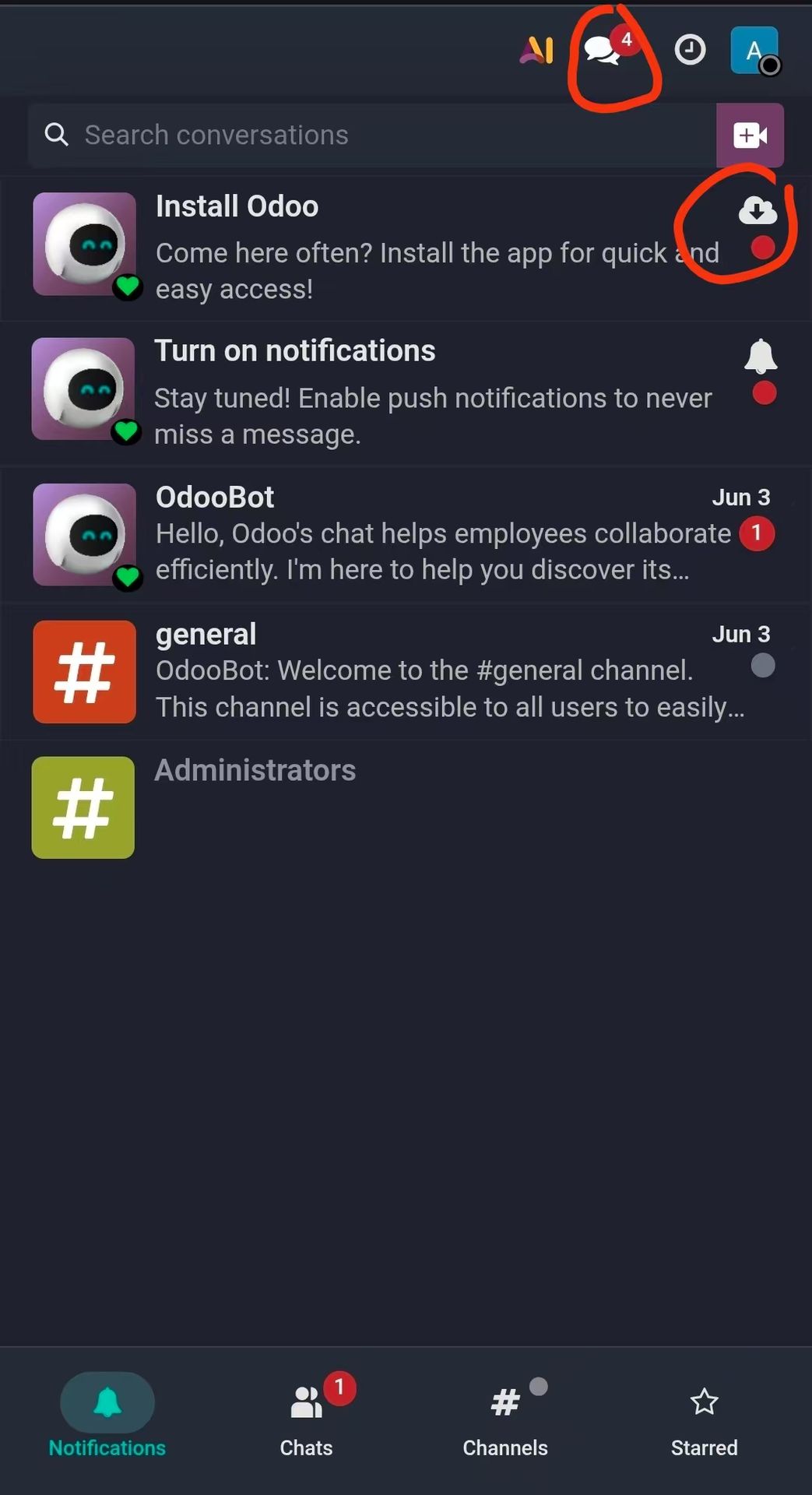
On the mobile web page, click "Activities", you can see "Install Odoo", click the icon to install
SOP for First-Time Setup
To ensure deployment integrity and clear communication paths, implementers should follow this operational sequence:
Verify user permissions and subscription statuses on the web terminal before launching mobile authentication pathways.
Enforce absolute protocol naming conventions by ensuring the https:// prefix is explicitly appended to protect raw data transit via Transport Layer Security (TLS).
Select the explicit database file name from the system dropdown prompt if your unique domain maps to multiple system databases.
Navigate to Android system settings to explicitly allow background processes and push notification routing for real-time chatter feeds and approval tasks.
Accelerate Your Digital Evolution with Slazie
Deploying mobile enterprise infrastructure involves clear alignment between software performance and your overarching business objectives. As a global-first Odoo partner, Slazie bridges this technical gap by building robust, high-performance IT integrations and custom business process adjustments tailored to international standards. Stop wrestling with configuration errors or unoptimized workflows.
Contact the expert consulting engineering team at Slazie today to maximize your enterprise operational potential, implement flawless workflows, and build an agile digital architecture.
References
Odoo. "Odoo Mobile Apps." Odoo 19.0 Documentation. Accessed June 9, 2026. https://www.odoo.com/documentation/19.0/administration/mobile.html.
Odoo S.A. "Odoo - Apps on Google Play." Google Play Store. Updated June 4, 2026. https://play.google.com/store/apps/details?id=com.odoo.mobile.